
Google continues to expand the role of artificial intelligence (AI) in its business tools, and one of its latest updates is the ability to connect your Google Business Profile (formerly Google My Business) with Gemini. This new integration is designed to make it easier for business owners to manage their online presence, save time, and improve customer engagement using AI-powered assistance. Instead of manually updating business information or creating content, eligible businesses can now use Gemini to perform many of these tasks with simple natural language prompts.
For local businesses, this update represents a significant step forward in how they interact with Google’s ecosystem. Once your Google Business Profile is connected to Gemini, you can ask AI to help update your business hours, draft Google Business Profile posts, suggest responses to customer reviews, summarize customer feedback, and provide useful insights about your business. These AI-powered features allow business owners to spend less time on routine profile management and more time focusing on serving customers and growing their business.
The integration also reflects Google’s broader vision of making AI an essential part of everyday business operations. As more users rely on AI-powered experiences such as Google Search AI Overviews and Gemini to find local businesses and services, keeping your Google Business Profile accurate, active, and optimized becomes even more important. Businesses that regularly update their profiles, respond to reviews, publish fresh content, and maintain complete information are better positioned to build trust with both customers and Google’s AI systems.
Whether you run a dental clinic, healthcare practice, real estate agency, coaching institute, hotel, restaurant, law firm, financial service, home service business, e-commerce store, or manufacturing company, connecting your Google Business Profile to Gemini can simplify profile management while helping you maintain a stronger online presence. Although this integration does not automatically improve search rankings, it makes it easier to follow the best practices that contribute to better local visibility and customer engagement.
In this guide, you’ll learn what Google’s new Gemini integration is, who can use it, how to connect your Google Business Profile to Gemini, the key benefits for businesses, common setup issues, and the best practices to maximize your local SEO and AI visibility in 2026.
What Is Google Business Profile (Formerly Google My Business)?
Google Business Profile (GBP), formerly known as Google My Business (GMB), is a free business listing tool provided by Google that helps businesses manage how they appear on Google Search and Google Maps. It allows business owners to create and verify their business profile, making it easier for potential customers to find accurate information such as the business name, address, phone number, website, operating hours, photos, products, services, and customer reviews.
Originally launched as Google My Business, the platform was rebranded to Google Business Profile in 2021 to simplify business management and bring more features directly into Google Search and Google Maps. Today, business owners no longer need a separate dashboard for many tasks—they can update their profile, respond to reviews, add photos, publish posts, and edit business information directly from Google Search or the Google Maps app.
A well-optimized Google Business Profile plays a crucial role in local SEO. When people search for products or services such as “dentist near me,” “digital marketing agency,” “real estate consultant,” or “hotel in Indore,” Google often displays a local map with nearby businesses. This section, commonly known as the Google Local Pack, highlights businesses with complete and relevant profiles. Having an optimized Google Business Profile increases your chances of appearing in these local search results, helping you attract more website visitors, phone calls, direction requests, and customer inquiries.
Google Business Profile offers several powerful features that help businesses connect with local customers. You can showcase high-quality photos and videos, list your products and services, publish updates and special offers, answer frequently asked questions, collect and respond to customer reviews, enable messaging, and monitor valuable performance insights such as profile views, search queries, calls, and website clicks. These features help businesses build credibility, improve customer trust, and encourage more people to choose their services.
With Google’s latest Gemini integration, Google Business Profile has become even more powerful. Eligible businesses can now connect their profile to Gemini and use AI to simplify profile management. Gemini can assist with drafting Google Business Profile posts, suggesting professional responses to customer reviews, summarizing customer feedback, updating business information, and providing personalized recommendations to improve your online presence. This makes it easier than ever for businesses to keep their profile active, accurate, and optimized for both traditional Google Search and the growing AI-powered search experience.
Whether you own a healthcare clinic, dental practice, real estate agency, coaching institute, e-commerce store, manufacturing company, law firm, financial consultancy, home service business, hotel, or restaurant, maintaining a complete and regularly updated Google Business Profile is one of the most effective ways to improve local visibility, build customer trust, and generate more leads online. As AI continues to shape the future of search, Google Business Profile remains one of the most important digital marketing tools for businesses that want to stay competitive.
What Is Gemini and How Does It Help Businesses?
Gemini is Google’s advanced artificial intelligence (AI) assistant, developed to help individuals and businesses complete tasks more efficiently using natural language. Built on Google’s latest AI models, Gemini can understand complex questions, generate content, analyze information, summarize data, and assist with a wide range of business activities. It is available through the Gemini web app and is increasingly integrated with Google’s products and services, making it a valuable tool for improving productivity and business management.
For businesses, Gemini is much more than a chatbot. It acts as an intelligent assistant that helps streamline daily operations, create marketing content, organize information, and make better decisions. Instead of spending hours writing posts, replying to reviews, or analyzing customer feedback, business owners can simply ask Gemini to perform these tasks using conversational prompts. This saves time while maintaining a consistent and professional online presence.
One of the most significant updates is Gemini’s integration with Google Business Profile. Eligible businesses can now connect their Google Business Profile to Gemini, allowing AI to assist with managing their business listing. Gemini can draft Google Business Profile posts, suggest personalized responses to customer reviews, summarize review trends, update business information such as operating hours, and provide recommendations to improve the profile. This makes it easier for businesses to keep their listings accurate, active, and optimized without manually handling every update.
Gemini is also a valuable tool for digital marketing. Businesses can use it to generate blog ideas, write website content, create social media captions, draft email campaigns, develop Google Ads copy, research keywords, and brainstorm marketing strategies. While AI-generated content should always be reviewed and refined by a human for accuracy and brand voice, Gemini can significantly reduce the time required to create high-quality marketing materials.
Beyond content creation, Gemini helps businesses analyze large amounts of information quickly. It can summarize customer reviews to identify common compliments or complaints, highlight recurring service issues, and suggest areas for improvement. This allows business owners to better understand customer needs and make informed decisions that enhance customer satisfaction and strengthen their reputation.
As Google continues to expand AI-powered search experiences, including Google AI Overviews and Gemini, businesses that adopt these tools early can improve their efficiency and stay competitive. Using Gemini alongside a well-optimized Google Business Profile, high-quality website content, strong local SEO, and regular customer engagement creates a stronger digital presence that aligns with Google’s vision for the future of search.
Whether you run a healthcare clinic, dental practice, real estate agency, coaching institute, e-commerce store, manufacturing company, SaaS business, law firm, financial consultancy, home service company, or hotel, Gemini can help simplify routine business tasks, improve customer communication, and support your overall digital marketing strategy. By combining AI-powered assistance with proven SEO and local marketing best practices, businesses can save time, enhance customer experiences, and focus more on long-term growth.
You Can Now Connect Your Google Business Profile to Gemini: What’s New?
Google has introduced a powerful new feature that allows eligible businesses to connect their Google Business Profile (GBP) directly to Gemini, making business management faster and more intelligent. Instead of manually updating your profile through Google Search or Google Maps, you can now use Gemini’s AI capabilities to perform many routine tasks with simple conversational prompts. This integration is designed to save time, improve productivity, and help businesses maintain an active and accurate online presence.
The first step is to connect your verified Google Business Profile to Gemini using the same personal Google account that manages your business profile. Once connected, Gemini can securely access your business information and provide AI-powered assistance tailored to your business. This creates a more streamlined way to manage your profile without switching between multiple Google tools.
After the connection is established, Gemini can help you update important business information such as your operating hours, phone number, website, business description, products, and services. Instead of navigating various settings, you can simply ask Gemini to make these updates using natural language. This ensures your customers always see accurate and up-to-date information when they find your business on Google Search or Google Maps.
Another major improvement is Gemini’s ability to create high-quality Google Business Profile posts. Whether you want to announce a new service, promote a special offer, share company news, or highlight an upcoming event, Gemini can generate professional post drafts within seconds. You can review, edit, and publish the content, helping you keep your profile fresh and engaging without spending hours writing updates.
Customer reviews are one of the most important factors in building trust, and Gemini now makes review management much easier. It can draft personalized responses to both positive and negative customer reviews, helping businesses maintain timely communication while preserving a professional tone. In addition, Gemini can summarize customer feedback by identifying common compliments, recurring concerns, and overall customer sentiment, giving business owners valuable insights into areas where they are performing well and where improvements may be needed.
How to Connect Your Google Business Profile to Gemini (Step-by-Step Guide)
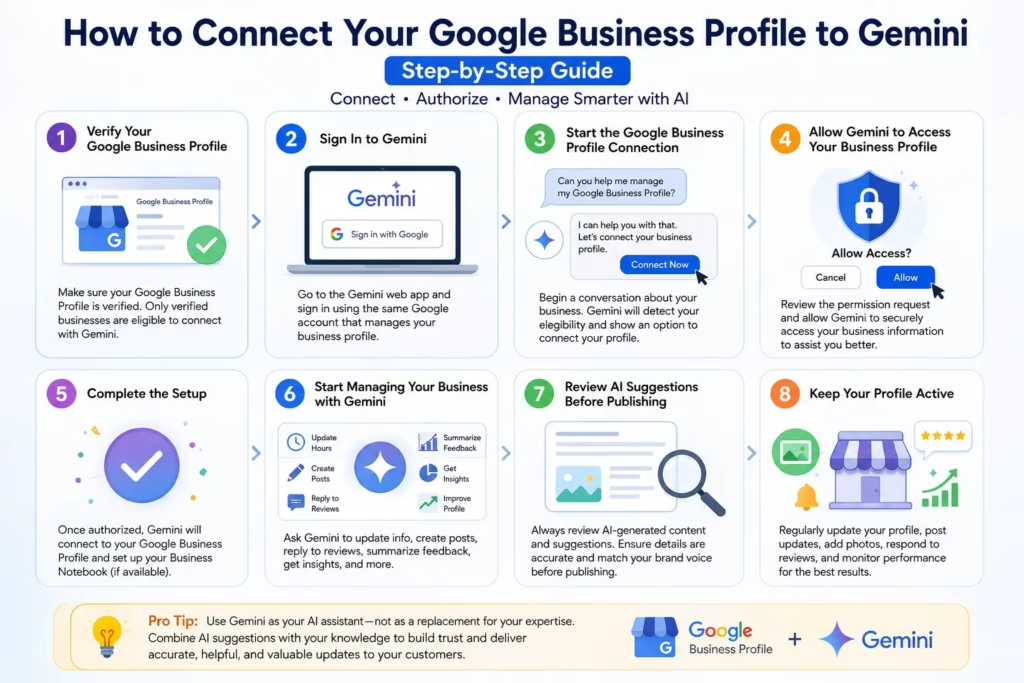
Connecting your Google Business Profile (GBP) to Gemini is a simple process, but there are a few eligibility requirements you should meet before getting started. You must have a verified Google Business Profile, be signed in with the same personal Google account that manages your business profile, and have access to the Gemini web app in a supported country or region. Once these requirements are met, you can connect your business profile and begin using Gemini’s AI-powered business management features.
Step 1: Verify Your Google Business Profile
Before connecting to Gemini, make sure your Google Business Profile is verified. If your profile is still pending verification, complete the verification process through Google Business Profile first. Only verified businesses are currently eligible for the Gemini integration.
Step 2: Sign In to Gemini
Visit the Gemini web app and sign in using the same personal Google account that you use to manage your Google Business Profile. If you manage multiple Google accounts, ensure you select the correct one to avoid connection issues.
Step 3: Start the Google Business Profile Connection
After signing in, begin a conversation with Gemini about your business. Gemini will detect that you manage a Google Business Profile and, if your account is eligible, it will display an option to connect your business profile. Follow the on-screen instructions to grant the required permissions.
Step 4: Allow Gemini to Access Your Business Profile
Review Google’s permission request carefully and approve the connection. This allows Gemini to securely access your business information so it can assist with profile management. Google only uses this access to perform the tasks you request.
Step 5: Complete the Setup
Once the permissions are approved, Gemini will connect to your Google Business Profile. In many cases, Google also creates a Business Notebook, which provides AI-powered recommendations and business insights based on your profile information.
Step 6: Start Managing Your Business with Gemini
After the setup is complete, you can begin using Gemini to help manage your Google Business Profile. For example, you can ask Gemini to:
- Update your business hours
- Create Google Business Profile posts
- Draft replies to customer reviews
- Summarize customer feedback
- Suggest improvements for your profile
- Explain your Business Profile performance
- Recommend ways to improve your local SEO presence
Step 7: Review AI Suggestions Before Publishing
Although Gemini can generate high-quality content and recommendations, you should always review the information before publishing it. Verify that business hours, contact details, promotional offers, and review responses are accurate and reflect your brand’s voice. Human oversight helps maintain trust with your customers.
Step 8: Keep Your Profile Active
Connecting your Google Business Profile to Gemini is only the beginning. To get the most value from the integration, regularly update your business information, publish new posts, upload recent photos, respond to customer reviews, and monitor your profile’s performance. An active and well-maintained profile helps improve customer engagement and supports your overall local SEO strategy.
Pro Tip
Use Gemini as your AI assistant—not as a replacement for your business expertise. Combine Gemini’s content suggestions with your knowledge of your customers and services to create accurate, helpful, and trustworthy updates. This approach helps you build a stronger online presence while following Google’s best practices for local search and AI-powered business management.
Key Benefits of Connecting Google Business Profile to Gemini
Connecting your Google Business Profile (GBP) to Gemini offers much more than just convenience—it introduces AI-powered assistance that helps businesses save time, improve customer engagement, and maintain a stronger online presence. Whether you’re a small business owner or manage multiple business locations, this integration simplifies many daily tasks while supporting your local SEO efforts.
One of the biggest benefits is faster profile management. Instead of manually navigating through Google Search or Google Maps to edit your business information, you can simply ask Gemini to update your business hours, contact details, services, or business description using natural language. This makes routine updates much quicker and ensures your profile remains accurate.
Another major advantage is AI-powered content creation. Gemini can help you write professional Google Business Profile posts for promotions, new product launches, business announcements, seasonal offers, and events. Publishing fresh content regularly keeps your profile active, increases customer engagement, and demonstrates to potential customers that your business is up to date.
Customer review management also becomes much easier. Gemini can draft thoughtful responses to both positive and negative reviews, helping businesses reply faster while maintaining a professional tone. Responding to reviews consistently builds customer trust and shows that you value customer feedback.
Gemini can also analyze customer reviews and summarize common trends. Instead of reading hundreds of reviews individually, business owners can quickly understand what customers appreciate most, identify recurring issues, and make informed improvements to their products or services. This helps enhance customer satisfaction and strengthen the business’s reputation.
Another valuable benefit is the ability to receive AI-powered recommendations for improving your Google Business Profile. Gemini may suggest uploading new photos, completing missing information, updating business categories, publishing more posts, or responding to unanswered reviews. These recommendations help businesses maintain a complete and engaging profile that aligns with Google’s best practices.
The integration also helps businesses understand their performance more easily. Gemini can explain profile insights, such as how customers found the business, which search queries are driving visibility, and how many people requested directions, visited the website, or made phone calls. These simplified insights help businesses make smarter marketing decisions.
Finally, connecting Google Business Profile to Gemini prepares businesses for the future of AI-powered search. As Google continues integrating AI into Search and Maps, businesses with active, complete, and regularly updated profiles will be better positioned to engage customers and maintain strong local visibility.
Common Setup Issues and How to Fix Them
Although connecting your Google Business Profile to Gemini is generally straightforward, some users may encounter setup issues. Most of these problems are easy to resolve by checking account settings and eligibility requirements.
A common issue is not seeing the option to connect Google Business Profile to Gemini. This usually happens because the feature is still being rolled out or the account doesn’t currently meet Google’s eligibility requirements. Ensure you’re using a supported region and language, and check whether your account has access to the feature.
Another frequent issue occurs when users sign in with the wrong Google account. Gemini only recognizes the Google Business Profile if you’re logged in with the same personal Google account that owns or manages the verified business profile. Switching to the correct account usually resolves this problem.
Some businesses cannot connect because their Google Business Profile has not yet been verified. Verification is mandatory before Gemini can access business information. If your profile is pending verification, complete the process first and then try connecting again.
Permission-related issues may also occur if required access isn’t granted during setup. Carefully review the permission request and allow Gemini to access your Google Business Profile. Without these permissions, Gemini cannot assist with profile management.
Businesses with multiple locations may experience confusion if they manage several Google Business Profiles under one account. Double-check that you’re selecting the correct business profile during the connection process.
If the connection still doesn’t work, clearing your browser cache, updating your browser, signing out and back into Gemini, or trying a different browser often resolves temporary technical issues.
Best Practices to Optimize Your Google Business Profile for Gemini and AI Search
Connecting your Google Business Profile to Gemini is only the first step. To maximize the benefits of AI-powered business management and improve your local search visibility, you should follow Google’s best practices consistently.
Start by ensuring your business information is complete and accurate. Keep your business name, address, phone number, website, business hours, services, and categories updated at all times. Accurate information helps customers trust your business and reduces confusion.
Upload high-quality photos and videos regularly. Businesses with fresh visual content often receive more engagement because customers can better understand the products, services, and atmosphere before visiting.
Publish Google Business Profile posts consistently. Share company news, special offers, events, seasonal promotions, product launches, or educational updates. Regular posting signals that your business is active and engaged with its audience.
Encourage satisfied customers to leave genuine reviews and respond to every review professionally. Positive reviews build credibility, while thoughtful responses demonstrate excellent customer service and increase trust.
Use Gemini to help create content, but always review AI-generated text before publishing. Verify facts, maintain your brand voice, and ensure that promotional information is accurate.
Choose the most relevant business categories and list all applicable services. Accurate categorization helps Google better understand your business and display it for relevant local searches.
Monitor your Business Profile insights regularly. Pay attention to customer searches, calls, website visits, direction requests, and engagement metrics to identify opportunities for improvement.
Finally, combine an optimized Google Business Profile with a fast, mobile-friendly website, local SEO, structured data, and helpful content. Together, these elements create a stronger online presence for both traditional Google Search and emerging AI-powered search experiences.
Frequently Asked Questions (FAQs)
1. What is Google Business Profile?
Google Business Profile is Google’s free business listing tool that helps businesses appear on Google Search and Google Maps while managing their online information.
2. Can every business connect Google Business Profile to Gemini?
No. Currently, the feature is available only for eligible businesses with a verified Google Business Profile and supported Gemini access.
3. Does connecting Google Business Profile to Gemini improve Google rankings?
No. The connection itself does not directly improve rankings. However, it helps businesses keep their profile active, accurate, and optimized, which supports local SEO best practices.
4. Is Google Business Profile free to use?
Yes. Creating and managing a Google Business Profile is completely free.
5. Can Gemini reply to customer reviews automatically?
Gemini can generate suggested replies, but business owners should review and approve them before publishing.
6. Can Gemini update my business information?
Yes. Gemini can help update business hours, descriptions, contact details, services, and other profile information after the connection is established.
7. Is my business data secure with Gemini?
Google uses permission-based access, and you control what Gemini can access. Always review permissions before connecting your account.
8. Should I still optimize my website if I use Gemini?
Absolutely. A well-optimized website, combined with an active Google Business Profile, remains essential for SEO, local visibility, and lead generation.
Conclusion
Google’s integration of Google Business Profile with Gemini marks an important step toward AI-assisted business management. Instead of spending valuable time performing routine tasks manually, business owners can now use Gemini to update their business information, create engaging Google Business Profile posts, draft review responses, analyze customer feedback, and gain useful business insights through simple conversational prompts.
While this integration doesn’t automatically improve your Google rankings, it makes it much easier to follow the best practices that contribute to long-term local SEO success. Businesses that maintain accurate information, publish fresh content, engage with customer reviews, and regularly optimize their profiles are more likely to build trust with both customers and Google’s AI-powered search systems.
As AI continues to reshape how people search for businesses online, adopting tools like Gemini early can help businesses stay competitive, improve operational efficiency, and deliver a better customer experience. Whether you’re a healthcare provider, real estate agency, coaching institute, e-commerce brand, manufacturer, law firm, financial consultant, home service provider, or hotel, combining Google Business Profile, Gemini, and a strong digital marketing strategy will position your business for continued growth in the AI-powered future.
Author Bio
StubbSpire Team
The StubbSpire Team is a group of experienced SEO specialists, digital marketers, content strategists, and AI search optimization experts dedicated to helping businesses grow online. We create practical, research-driven content on SEO, Google Business Profile, AI Search Optimization (AISO), Google Ads, Local SEO, content marketing, and lead generation to help businesses improve visibility, attract qualified customers, and achieve sustainable digital growth in the evolving world of search.